add-circle-bold add-circle add-square add alarm-bell-1 alert-diamond analytics-pie-2 archive archive arrow-down-1 arrow-down-2 arrow-left-1 arrow-right-1 arrow-up-1 attachment-1 bin-paper-1 book-star button-record check-1 check-circle-1 close close-quote close cog-1 cog common-file-stack copy-paste credit-card-1 diagram-fall-down disable time-clock-midnight download-thick-bottom drawer-send envelope-letter envelope-letter expand-6 expand-6 file-code filter-1 floppy-disk flying-insect-honey folder-file-1 headphones-customer-support hierarchy-9 hyperlink-2 information-circle keyboard-arrow-down keyboard-arrow-up layout-module-1 list-bullets lock-2 lock-unlock-1 love-it messages-bubble-square move-to-top multiple-circle multiple-neutral-1 multiple-users-1 navigation-menu-horizontal navigation-menu network-browser open-quote pencil-1 pencil-write pencil-1 print-text rating-star rating-star remove-circle remove-square-1 search send-email-1 shield-warning single-neutral-actions single-neutral smiley-sad-1 smiley-unhappy smiley-indifferent smiley-smile-1_1 smiley-happy smiley-sad-1 smiley-unhappy smiley-indifferent smiley-happy smiley-thrilled social-media-twitter synchronize-arrows-1 tags-double ticket-1 ticket-1 time-clock-circle undo view-1 view-off view wench

The Differences Between Lost, Won, Open, and Abandoned

When you are on the opportunities tab, you may see the words like lost, won, open and abandoned and wonder what they may mean.


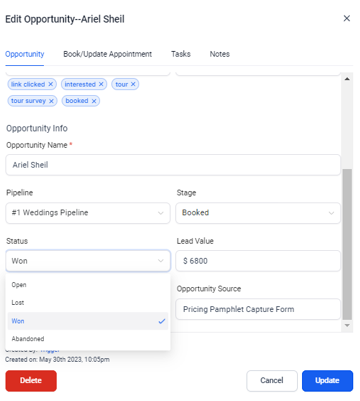
Open: Clients that are still in the automated campaigns and have not made a clear decision to either book or not book

Won: Clients that have officially booked with your venue

Lost: Clients that have directly told you that are not interested anymore or don't want to book because they've already chosen another venue. A contact is automatically marked as Lost when they are put on DND.

Abandoned: This is not a required feature that we advise you to use. However, if you would like to categorize the leads that have "ghosted" you, you can manually edit the opportunity to be marked as abandoned.


Within The Pipeline:

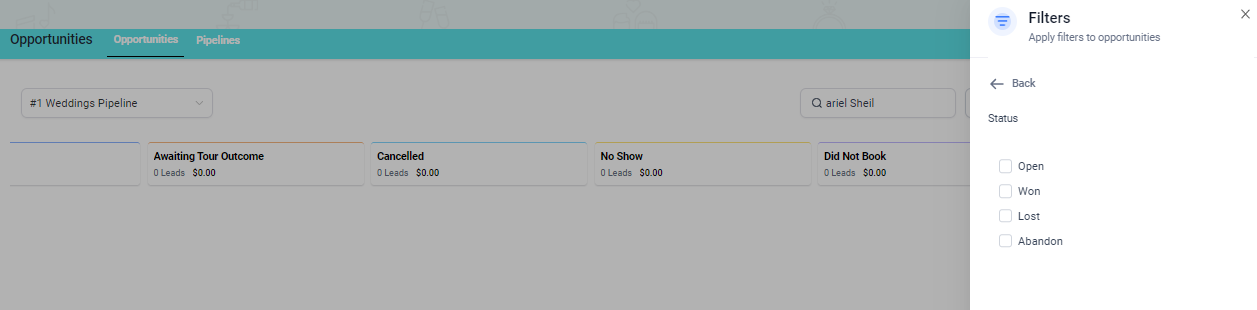
You can filter your pipeline based on these categories


For Each Opportunity: