add-circle-bold add-circle add-square add alarm-bell-1 alert-diamond analytics-pie-2 archive archive arrow-down-1 arrow-down-2 arrow-left-1 arrow-right-1 arrow-up-1 attachment-1 bin-paper-1 book-star button-record check-1 check-circle-1 close close-quote close cog-1 cog common-file-stack copy-paste credit-card-1 diagram-fall-down disable time-clock-midnight download-thick-bottom drawer-send envelope-letter envelope-letter expand-6 expand-6 file-code filter-1 floppy-disk flying-insect-honey folder-file-1 headphones-customer-support hierarchy-9 hyperlink-2 information-circle keyboard-arrow-down keyboard-arrow-up layout-module-1 list-bullets lock-2 lock-unlock-1 love-it messages-bubble-square move-to-top multiple-circle multiple-neutral-1 multiple-users-1 navigation-menu-horizontal navigation-menu network-browser open-quote pencil-1 pencil-write pencil-1 print-text rating-star rating-star remove-circle remove-square-1 search send-email-1 shield-warning single-neutral-actions single-neutral smiley-sad-1 smiley-unhappy smiley-indifferent smiley-smile-1_1 smiley-happy smiley-sad-1 smiley-unhappy smiley-indifferent smiley-happy smiley-thrilled social-media-twitter synchronize-arrows-1 tags-double ticket-1 ticket-1 time-clock-circle undo view-1 view-off view wench

What To Do If You Forget to Report the Outcome of a Tour

If You Have NOT Been in Communication With the Contact:

If you have not had communication with the client since the tour, search the clients name in your email to find the Tour Outcome Survey email that we sent you one hour after the tour. Submit the form per usual.

Here is what the email should look like:
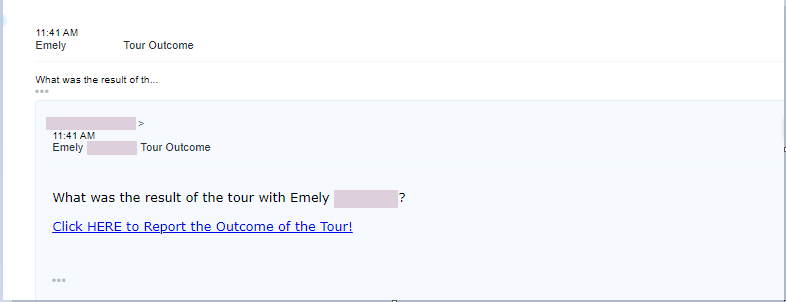
Just remember, whenever you report the outcome of a tour, they will automatically be put into a follow up campaign based on the outcome of the tour.


If You've Been in Communication With the Contact:

If you've been in communication with the client since their tour, sending them a follow up message thanking them for visiting the venue will most likely not be appropriate. 

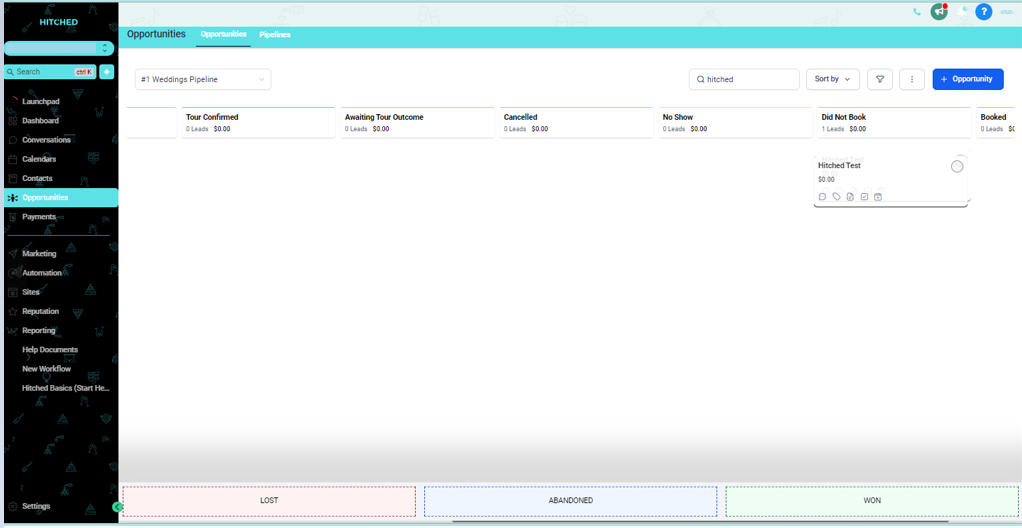
You'll want to manually move them in your opportunities pipeline by dragging and dropping them into the correct stage based on the outcome of their tour. This only adds them to the correct stage in the pipeline and does not add them to any automated campaigns.

Any follow up with this client will need to be manually done by your team.