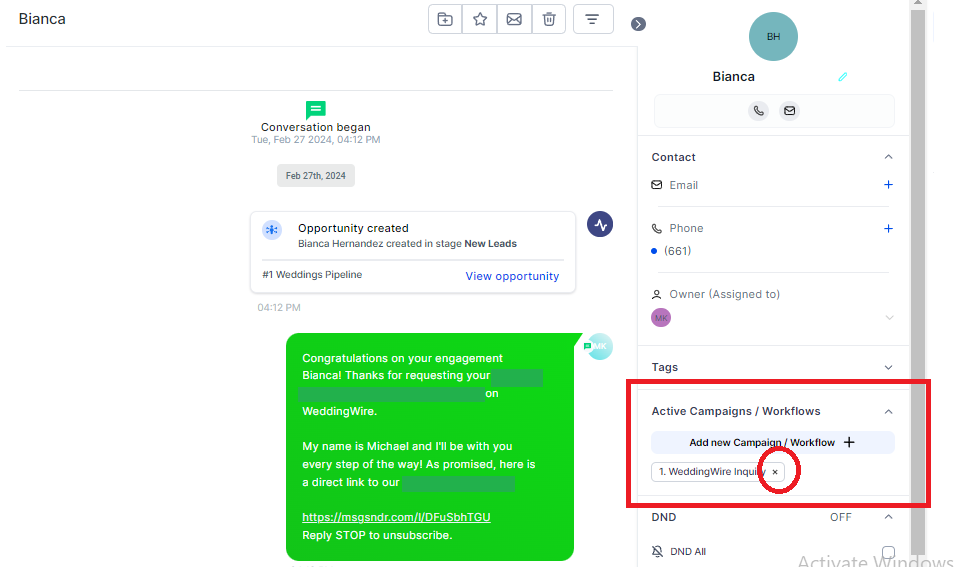
There are some cases in which you would need to remove a client from a particular campaign.
There are a few ways to do this:
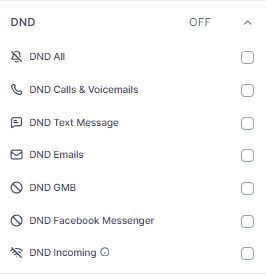
1. Turn on the DND button
When you turn on the DND All button, the client will be automatically removed from all marketing campaigns. HOWEVER, they will not be able to receive any other automated texts or emails. CLICK HERE to learn more about DND.
2. Manually Remove from an Active Campaign
After clicking the initials of the client, you can manually remove him/her from the Active Campaign he/she is in by clicking the x button from that campaign. When you do this, they will no longer receive the messages that are inside that campaign so you have to manually follow up on them.