What Does "Not Yet Ready" Mean?
How often do you get the response "Love your venue, but we are just looking at pricing right now" or possibly even "My fiance is in the military and will be overseas until August, we won't start touring venues until he gets back in three months."
These responses are typical, and we wouldn't want to put them on DND, and we definitely wouldn't want them to receive a message in 4 days asking them how their venue search was going.
These contacts are currently in your sales pipelines "Grey Area". This means that they didn't say that they weren't interested in your venue, but they also aren't ready to move forward with scheduling a tour.
This is why have the "Not Yet Ready" stage to your pipeline between your "Hot Leads" and "Interested" Stages.

The pipeline stage "Not Yet Ready" is going to help you categorize those that are interested in your venue, but for whatever reason, they just aren't ready to schedule a tour.
How to Add a Contact to "Not Yet Ready"
From now on, all you have to do is add the tag "Not Yet Ready" to a contact, and it will remove them from all automated campaigns and add them to the "Not Yet Ready" stage in your pipeline, where we will manually reactivate them in a few months when they have had some time to process their engagement and start planning their wedding.
DESKTOP
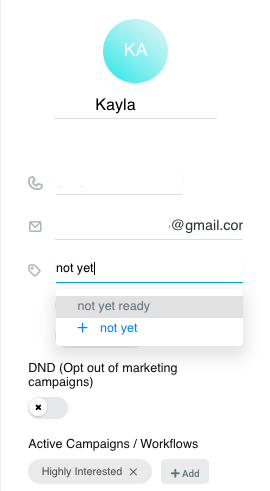
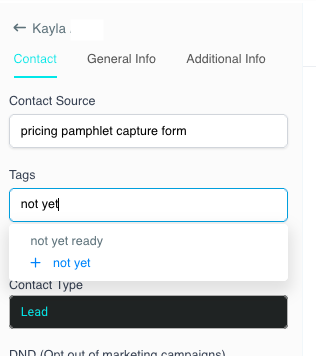
To add a contact to the "Not Yet Ready" stage in the sales pipeline, all you have to do is add the tag "Not Yet Ready" to the contact. On the desktop, this can be done inside of the conversation and on the contact screen.
Within the conversation:
Within the contact information:
MOBILE
Inside of your conversation with the contact, click the 3 dots in the top right-hand corner of your screen, select "View Contact" >> select "Edit Info" >> once you find where you're able to "Add Tags" >> add the tag "Not Yet Ready" >> click the Check Mark in the top right-hand corner of your screen.
Quick Tips
Just to clarify, the "Not Yet Ready" stage is NOT for those that say "Let me chat with my fiance and get back to you" or "I'm going to reach out to schedule a tour once I know what my schedule looks like for the rest of the week."
The "Not Yet Ready" stage is specifically for those that you need to reach out to in a few months because for whatever reason, they are not ready to schedule a tour in the near future.
Watch the “Not Yet Ready” Demo: https://www.loom.com/share/0585cd3af6574450b310c5a2ee7c65d2