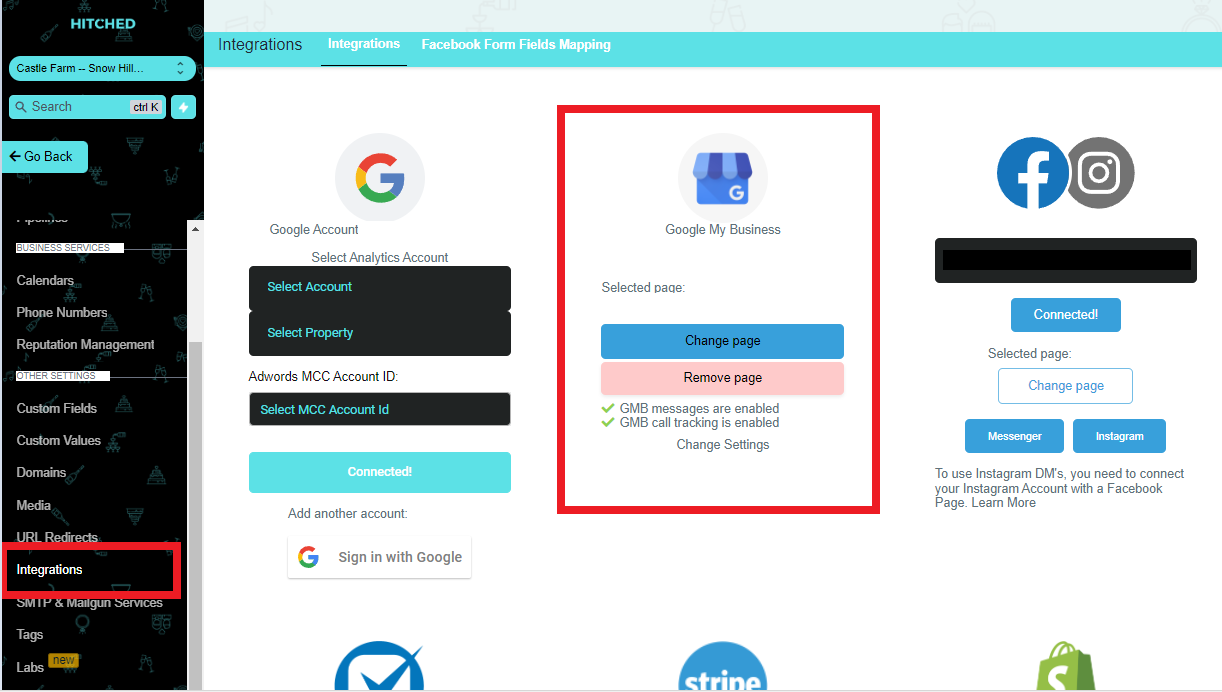
Outside of the standard email and texting through the Hitched CRM System, we are also able to connect with both Facebook Messenger and Google My Business Messenger.
Once connected, these messages will appear in your conversations tab as usual.
We do not automatically send any messages to these clients, as there is a lot more variation in the messaging they are sending.
If you find yourself wanting to add the client to an automated campaign, please follow these steps.
Facebook Messenger
This is the icon you will view when someone messages you using Facebook Messenger.
Google My Business Messenger
How to Integrate Google My Business Messenger
Google My Business is a Google feature wherein they can send you messages from Google, whenever they search for your business via mobile phone. To integrate google my business you need to do the following:
- Go to Settings.
- Click Integration.
- Then select a GMB page.
- Enable the GMB call tracking.
- Click Connect.